In this article
If your business is registered for VAT in Saudi Arabia, an invoice is no longer just a document you send to a customer. It is a record that the Zakat, Tax and Customs Authority (ZATCA) expects you to create, store and, in many cases, share with it in a set format. The program is called Fatoora, and it has been introduced in two phases.
This guide is written for owners and finance managers of small and mid-size businesses. It explains what each phase requires, how standard and simplified tax invoices are handled, what a ZATCA e-invoicing system has to do, and the steps to take before your Phase 2 date arrives.
What ZATCA e-invoicing (Fatoora) is and who it applies to
E-invoicing in Saudi Arabia means issuing, exchanging and storing tax invoices, along with their credit and debit notes, in a structured electronic format through a compliant solution. ZATCA runs the program, and the Fatoora system is the platform it uses to receive and validate invoices.

The rules apply to VAT-registered taxpayers in the Kingdom. They also cover anyone who issues tax invoices on behalf of a VAT-registered business, such as a provider that handles billing for a client.
The program arrived in two steps:
- Phase 1, Generation: issue and store invoices electronically. In force since 4 December 2021.
- Phase 2, Integration: connect your invoicing system to Fatoora so ZATCA receives your invoices. Rolled out in waves from 1 January 2023.
Phase 2 builds on Phase 1. Everything you put in place for generation still applies after you integrate, so it pays to get the basics right first.
Phase 1: generation requirements
Since 4 December 2021, VAT-registered businesses must issue, store and amend invoices electronically using a compliant solution. In practice, that ends several habits many small businesses relied on:
- Handwritten invoices are not accepted.
- Invoices typed in Word or a spreadsheet and saved as a plain PDF are not accepted.
- Simplified tax invoices must include a QR code.
- Issued invoices cannot be edited or deleted without a trace.
The last point has the biggest effect on daily work. A compliant solution is designed to prevent tampering. If an issued invoice is wrong, you do not overwrite it. You issue a credit note or debit note that refers to the original, so the record shows what changed and when.
Phase 1 does not require your system to send anything to ZATCA. It is about how invoices are produced and kept. That is why many businesses treated it as a software change and Phase 2 as a larger project.
Phase 2: integration and how the waves work
Phase 2 started on 1 January 2023. Instead of moving every business at once, ZATCA brings taxpayers in by waves based on taxable revenue. Each wave has its own go-live date, and ZATCA notifies the taxpayers in a wave at least six months in advance.
If you have not received a notification, you are not yet required to integrate. If you have, the date in that notification is the one to plan around. Check your notification from ZATCA rather than relying on lists shared online, which may be out of date or not apply to you.
Invoice format and the cryptographic stamp
In Phase 2, invoices are produced in XML using the UBL 2.1 standard. To share an invoice with a customer, you can send a PDF/A-3 file with the XML embedded inside it. The PDF is a readable copy. The structured XML is the invoice ZATCA works with.
Each invoice also carries a cryptographic stamp. This is a digital signature that links the invoice to your registered solution and makes any later change detectable.
Onboarding your solution with a CSID
Before your system can connect to Fatoora, it has to be onboarded. You log in to the Fatoora portal and generate a one-time password, and your e-invoicing solution uses it to request a Cryptographic Stamp Identifier (CSID). The CSID identifies that solution to ZATCA and is used when stamping and submitting invoices. If you issue invoices from more than one system or branch, each invoicing unit typically needs its own CSID.
Clearance and reporting
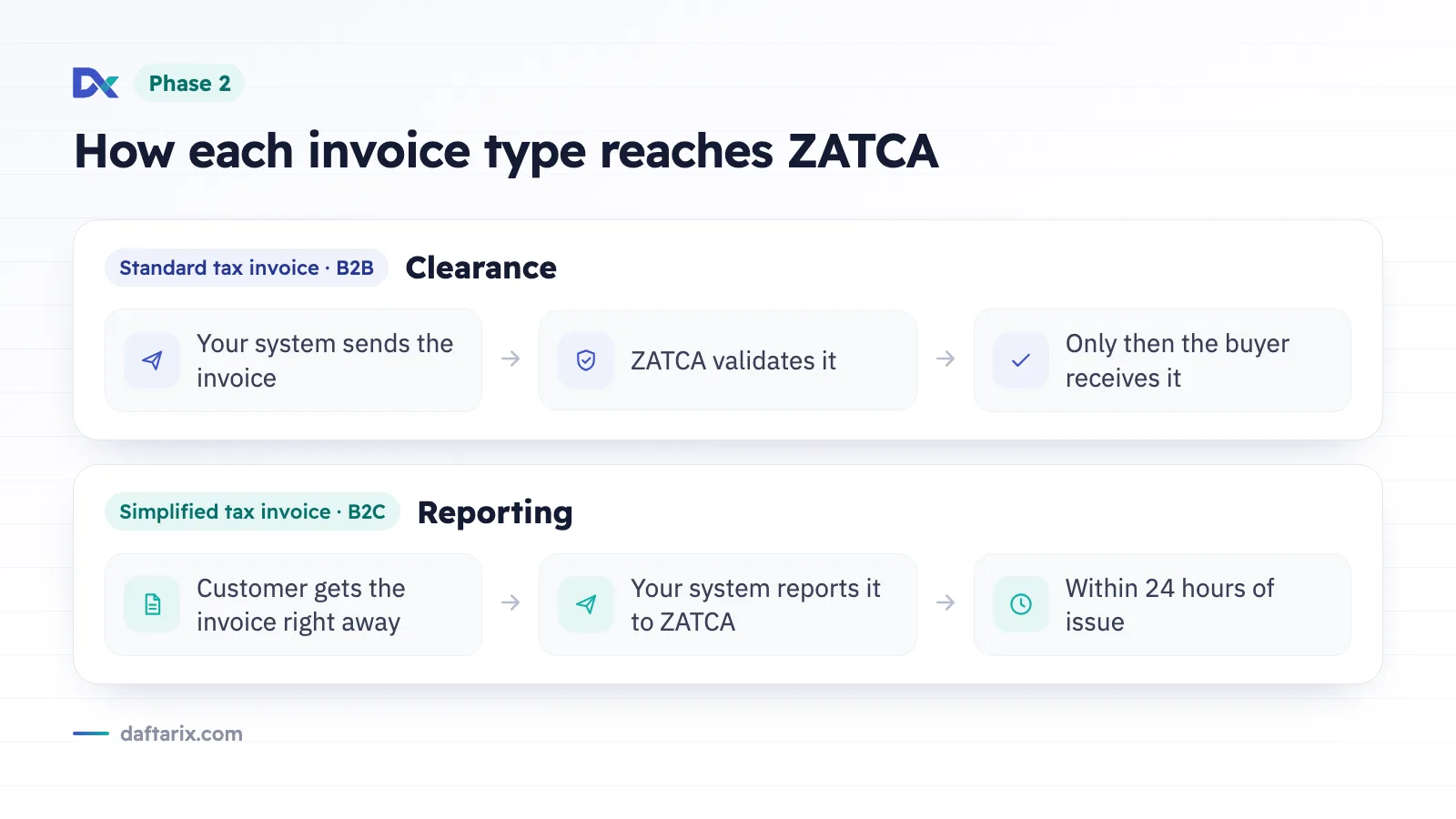
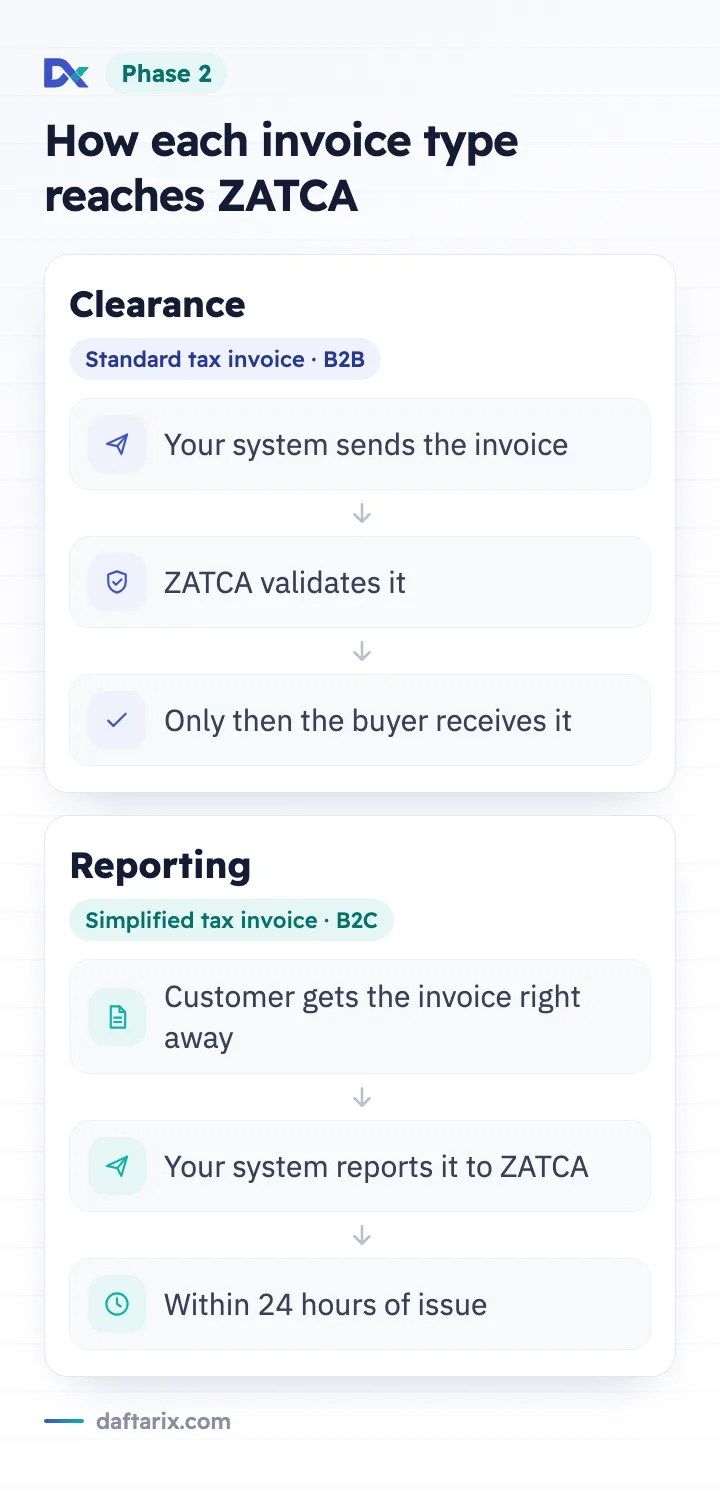
Phase 2 handles the two invoice types differently:
- Clearance applies to standard tax invoices (B2B). Your system sends the invoice to ZATCA, ZATCA validates it, and only then does the buyer receive it.
- Reporting applies to simplified tax invoices (B2C). You give the invoice to the customer right away, then report it to ZATCA within 24 hours of issue.
Standard vs simplified tax invoices
Knowing which type you issue tells you which Phase 2 flow applies. Many businesses issue both: standard invoices to corporate clients and simplified invoices at the counter or through an online store.

| Point | Standard tax invoice | Simplified tax invoice |
|---|---|---|
| Typical buyer | Another business (B2B) | An individual consumer (B2C) |
| Phase 2 flow | Clearance | Reporting |
| When ZATCA sees it | Before the buyer receives it | After issue, within 24 hours |
| QR code | Optional in Phase 1; included on the cleared invoice in Phase 2 | Mandatory, generated by your solution |
| Format in Phase 2 | XML (UBL 2.1), shareable as PDF/A-3 with embedded XML | XML (UBL 2.1), shareable as PDF/A-3 with embedded XML |
| Credit and debit notes | Cleared, like the original invoice | Reported, like the original invoice |
The last row is easy to miss. A correction follows the same path as the invoice it adjusts, so your process for credit notes needs to work for both flows.
What a compliant e-invoicing system must do
Whether you build, buy or subscribe, the ZATCA invoicing system you rely on should handle the following:
- Generate structured invoices. Produce XML in UBL 2.1 with the required fields, plus a readable copy for the customer.
- Add the QR code to every simplified tax invoice.
- Apply the cryptographic stamp using the CSID obtained through the Fatoora portal.
- Send standard invoices for clearance and wait for ZATCA's response before sharing them.
- Report simplified invoices within 24 hours, with a way to retry if the connection drops.
- Prevent tampering. No silent edits or deletions. Corrections go through credit and debit notes.
- Store invoices securely and make them easy to find when you need them.
- Calculate VAT correctly, applying the 15% rate where it applies and showing tax amounts in SAR.
- Support Arabic on invoices, with English alongside if your customers need it.
When you compare options, ask the vendor to show each of these steps working on a test invoice. A feature list is not proof.
A practical checklist to get ready
Use this list whether your Phase 2 date is close or you have not been notified yet.

- Confirm your status. Check your VAT registration details and look for any wave notification from ZATCA.
- Map your invoice types. Note where you issue standard invoices and where you issue simplified ones, including branches, online sales and staff in the field.
- List every system that issues invoices. Point of sale, ERP, accounting software, spreadsheets and any manual process. Each one needs a compliant route.
- Clean up customer data. Standard invoices need complete buyer details, such as VAT numbers and addresses, to clear without errors.
- Choose or upgrade your solution. Confirm it supports Phase 1 and Phase 2, including clearance, reporting and CSID onboarding.
- Prepare portal access. Make sure the right person can log in to the Fatoora portal and owns the onboarding steps.
- Test before go-live. Issue sample standard and simplified invoices, plus a credit note, and confirm each one clears or reports as expected.
- Train your team. Staff should know that issued invoices cannot be edited and how to raise a credit or debit note instead.
- Set a daily check. Assign someone to review rejected or unreported invoices so problems are fixed within the reporting window.
Where Daftarix fits
Daftarix is a SaaS platform that brings a sales CRM, quotations and invoicing, and a help desk into one place, in Arabic and English with a right-to-left layout. Tax invoices are issued in SAR with 15% VAT, and payments and reports sit next to them.
It is built as a ZATCA e-invoicing system that supports Phase 1 and Phase 2, with Fatoora integration for clearance and reporting. Because customer records, quotations and invoices live in the same system, the buyer details your standard invoices depend on are kept in one place. You can see how invoicing connects to payments and reporting on the accounting page.
Daftarix is lifetime free for one user. Teams can ask for pricing.
Frequently asked questions
When does my business need to integrate with Fatoora?
Phase 1 has applied to VAT-registered businesses since 4 December 2021. For Phase 2, ZATCA groups businesses into waves by taxable revenue and notifies each one at least six months before its date. Check your notification from ZATCA for your exact deadline.
Can I still send invoices as PDF files?
Not as plain PDFs made in Word or a spreadsheet. Invoices must come from a compliant solution. Under Phase 2, the invoice itself is XML, and you can share it with customers as a PDF/A-3 file that has the XML embedded.
What if I need to change an invoice after issuing it?
You cannot edit or delete it. Issue a credit note or debit note that refers to the original. Under Phase 2, that note goes through the same clearance or reporting flow as the invoice it corrects.
Is there a free ZATCA invoicing system?
Some providers offer free plans. Daftarix, for example, is lifetime free for one user. Whatever you choose, confirm it covers QR codes, cryptographic stamping, CSID onboarding, clearance and reporting before you depend on it for live invoices.
Ready to move your invoicing onto a system built for Fatoora? Start with Daftarix free for one user, see pricing for teams, or talk to our sales team.